

Analyzing Booking Windows in Tableau
A teammate asked how close to showtime customers book tickets, how that differs by ticket type, and how many bookings and gross sales occur 0–30 and 31–60 minutes before showtime. They also wanted this available by event date.
Here’s how I approached it in Tableau.
Step 1: Calculate Total Minutes Before Showtime
First, I calculated the difference in minutes between the transaction date and the event (item) date:
Last Sale (minutes):DATEDIFF('minute', MAX([Transaction Date]), MAX([Item Date]))Using MAX() ensures the calculation evaluates correctly at the event level in Tableau.
Step 2: Convert Minutes to dd-hh-mm Format
To display the time difference as days, hours, and minutes, I used modulo (%) to isolate the remainder after removing larger time units.
- 1440 minutes = 1 day
- 60 minutes = 1 hour
Days
INT([Last Sale (minutes)] / 1440)Hours
INT(([Last Sale (minutes)] % 1440) / 60)Minutes
[Last Sale (minutes)] % 60Modulo works here by stripping out completed time units and returning only the remainder. This allows us to progressively isolate days, then hours, then minutes.
This calculation converts total minutes into a formatted string while correctly handling negative values (sales occurring after event time).
Last Sale (dd-hh-mm):IF [Last Sale (minutes)] < 0 THEN "-" + STR(INT(ABS([Last Sale (minutes)]) / 1440)) + "d " + STR(INT((ABS([Last Sale (minutes)]) % 1440) / 60)) + "h " + STR(ABS([Last Sale (minutes)]) % 60) + "m"ELSE STR(INT([Last Sale (minutes)] / 1440)) + "d " + STR(INT(([Last Sale (minutes)] % 1440) / 60)) + "h " + STR([Last Sale (minutes)] % 60) + "m"END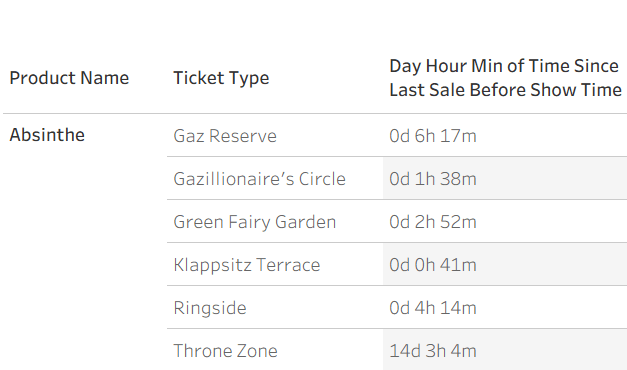
Step 3: Same-Day Booking Window (0–60 Minutes)
To analyze bookings within the final hour before showtime, I created:
IF DATEDIFF('day', [Transaction Date], [Item Date]) = 0AND DATEDIFF('minute', [Transaction Date], [Item Date]) >= 0THEN DATEDIFF('minute', [Transaction Date], [Item Date])ENDFrom there, I bucketed into:
IF [Minutes Before Show] <= 30 THEN "0–30"ELSEIF [Minutes Before Show] <= 60 THEN "31–60"ENDThis allowed aggregation of bookings and gross sales by final-minute booking windows.



 Kylelar Maravich Business Page
Leave a comment